Using Antigravity as your code editor? Get the same professional SQL formatting power that developers love in VS Code. The SQLinForm extension brings 200+ formatting options to Antigravity – format any SQL dialect with a single click, completely offline.
With the SQLinForm extension, you can quickly format your SQL code in two easy ways:
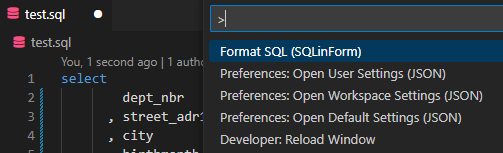
✅ Using the Command Palette:
Open your SQL file.
Press Ctrl + Shift + P (Windows/Linux) or Cmd + Shift + P (Mac) to open the Command Palette.
Search for „Format SQL with SQLinForm“ and select it.
Your SQL code will be instantly formatted!
Format with a right-click
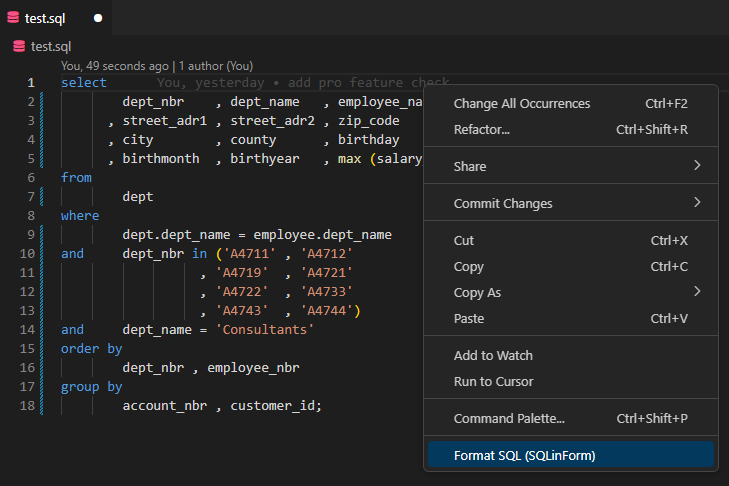
✅ Using the Context Menu for .sql Files:
Right-click inside any .sql file.
Select „Format SQL with SQLinForm“ from the context menu.
The SQL code is formatted automatically!
DB support
The Antigravity SQL Formatter supports a wide range of SQL dialects across major database systems.
✅ ANSI SQL
✅ Aurora
✅ Azure SQL
✅ BigQuery
✅ ClickHouse
✅ Databricks SQL
✅ DB2 (z/OS & UDB)
✅ DuckDB
✅ Greenplum
✅ HyperSQL
✅ Informix
✅ MariaDB
✅ MS Access
✅ MySQL
✅ Oracle
✅ PostgreSQL
✅ Redshift SQL
✅ SAP HANA
✅ Snowflake
✅ SQL Server
✅ SQLite
✅ Sybase
✅ Teradata
✅ Vertica
✅ Yellowbrick
SQLinForm continuously evolves — new dialects are added regularly to ensure precise formatting for every major SQL environment.
FAQ - Frequently Asked Questions
Is the Antigravity SQL Formatter free? Yes, the basic version is completely free with no time limits or SQL size restrictions. The Pro version unlocks 200+ formatting options.
Does it work offline? Yes, SQLinForm processes everything locally – your SQL never leaves your machine.
What databases are supported? SQLinForm supports 25+ dialects including Oracle, PostgreSQL, MySQL, SQL Server, Snowflake, BigQuery, and all major cloud databases.
Can I share formatting settings with colleagues? Yes, export your profile and share it for consistent team formatting.
Lorem ipsum dolor sit amet, consectetur adipiscing elit. Ut elit tellus, luctus nec ullamcorper mattis, pulvinar dapibus leo.